
Skip to content
For weddings in the United States

From ‘yes’ to I do.

Between the proposal and the day itself sits a year of planning. Wedding Overview makes that a calm year: guest list, budget, day-of timeline, and your wedding website in one place.

The demo is a fully built demo wedding. Create a free account and click around anywhere.

Sound familiar?

Right now, everything is everywhere.

The group chat with your mom and your future mother-in-law. Three versions of guest_list.xlsx. A mail folder full of quotes. And at night in bed, the feeling you forgot something.

Group chatWedding 🫶 · mom, Aunt Carol, James +5
mom: Did you call the florist yet? And what does Grandma actually eat?
Spreadsheetguest_list_FINAL_v3.xlsx
14The Bennettsdinner?
15Grandma Dotgluten??
16Olivia & Ethanreception
Mail
RE: RE: RE: Quote - Northlight Photography
yesterday 2:32 PM · still to answer

Not because you are doing it wrong, but because a wedding is more than a hundred decisions that all depend on each other.

It does not have to fit in your head.

The demo

Look over the shoulders of Emily & James.

No empty screens and promises: the demo is a fully built wedding with real guests, quotes, and a day-of timeline. This is what you will see.

Click through their wedding yourself →

Create a free account and look as long as you like.

app.weddingoverview.com · demo wedding Emily & James
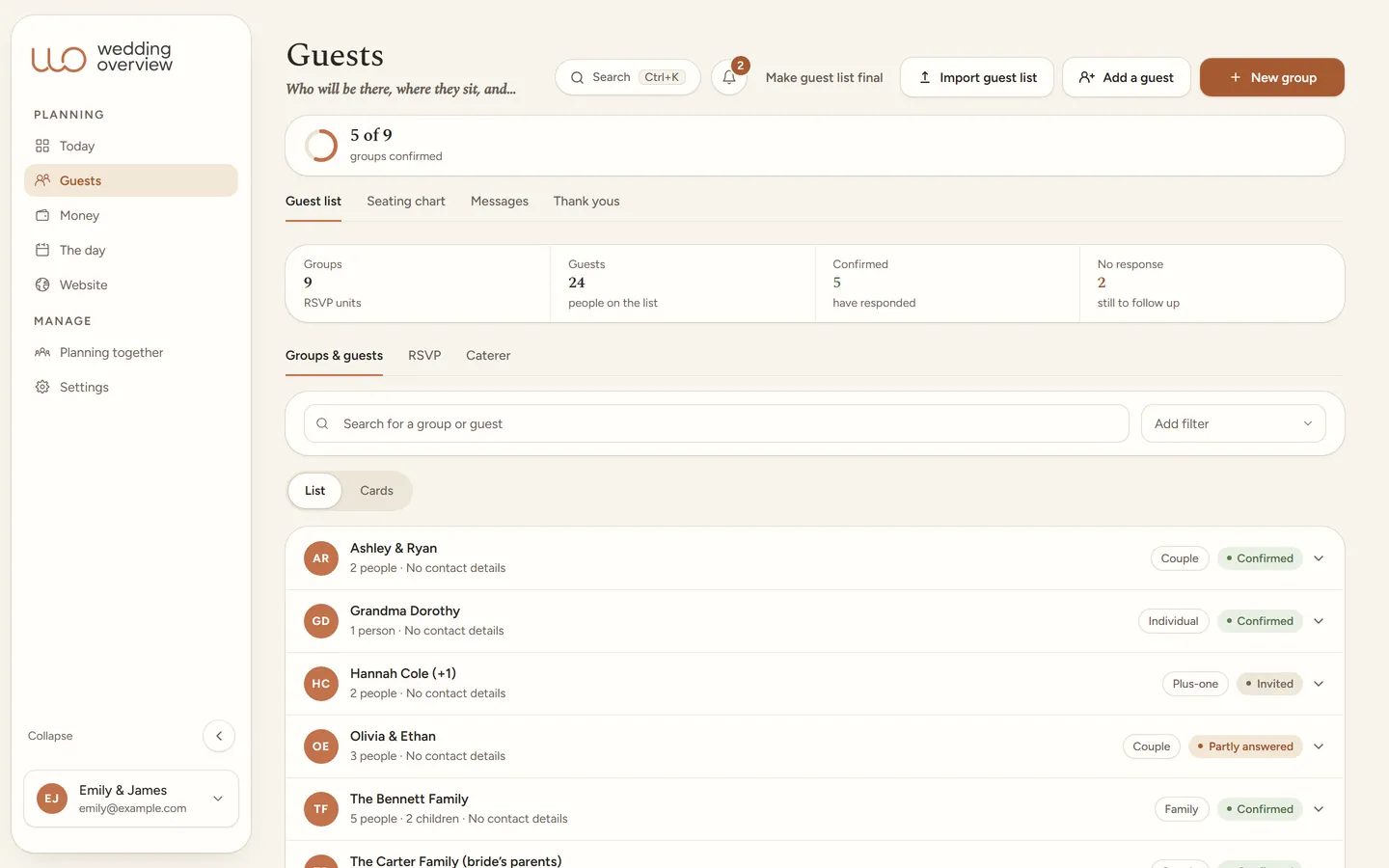
The guest list in the app: 9 groups and 24 guests, with the RSVP status and headcount per group.
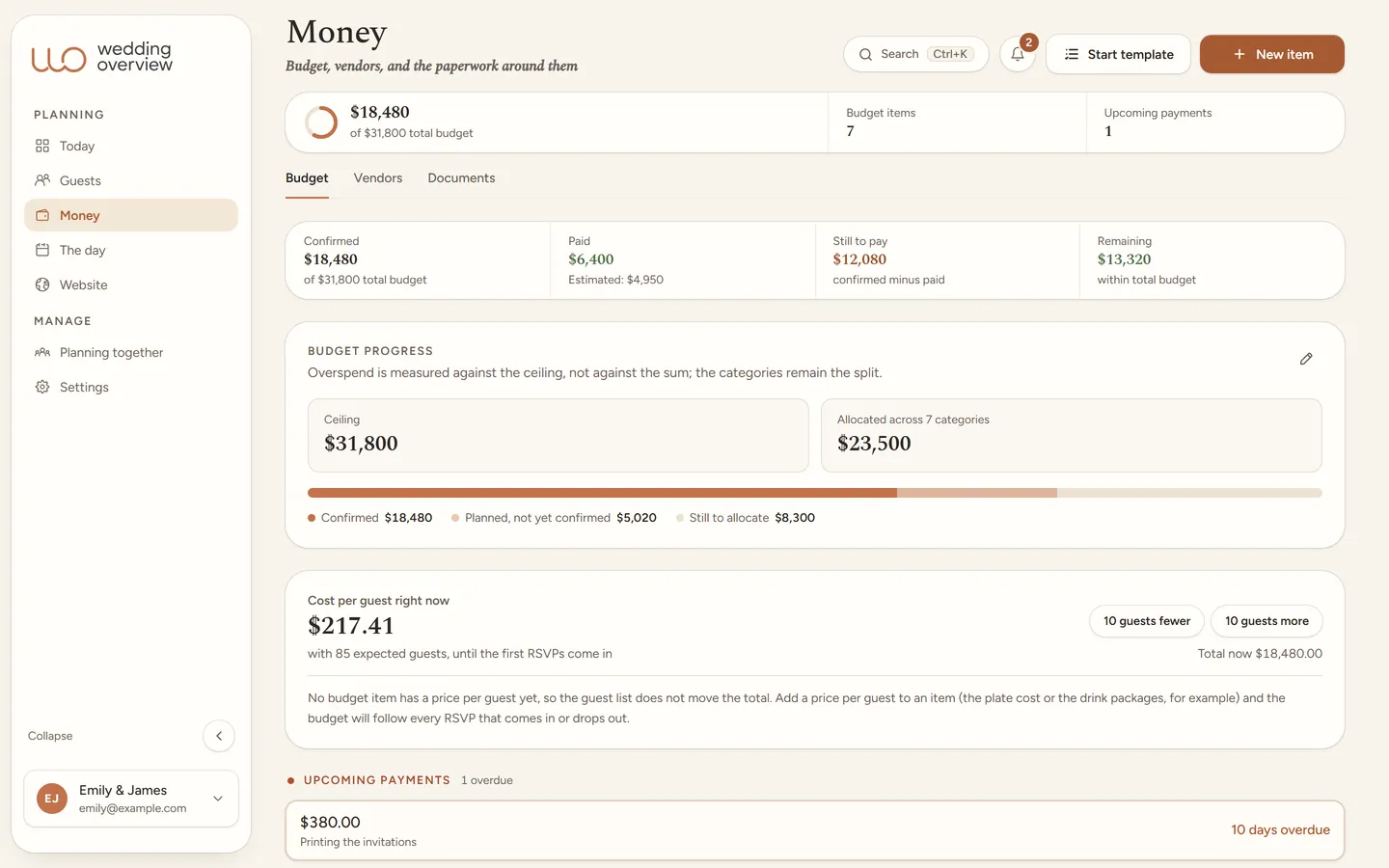
The money overview in the app: confirmed, paid and still to pay, the cost per guest, and one payment that is overdue.
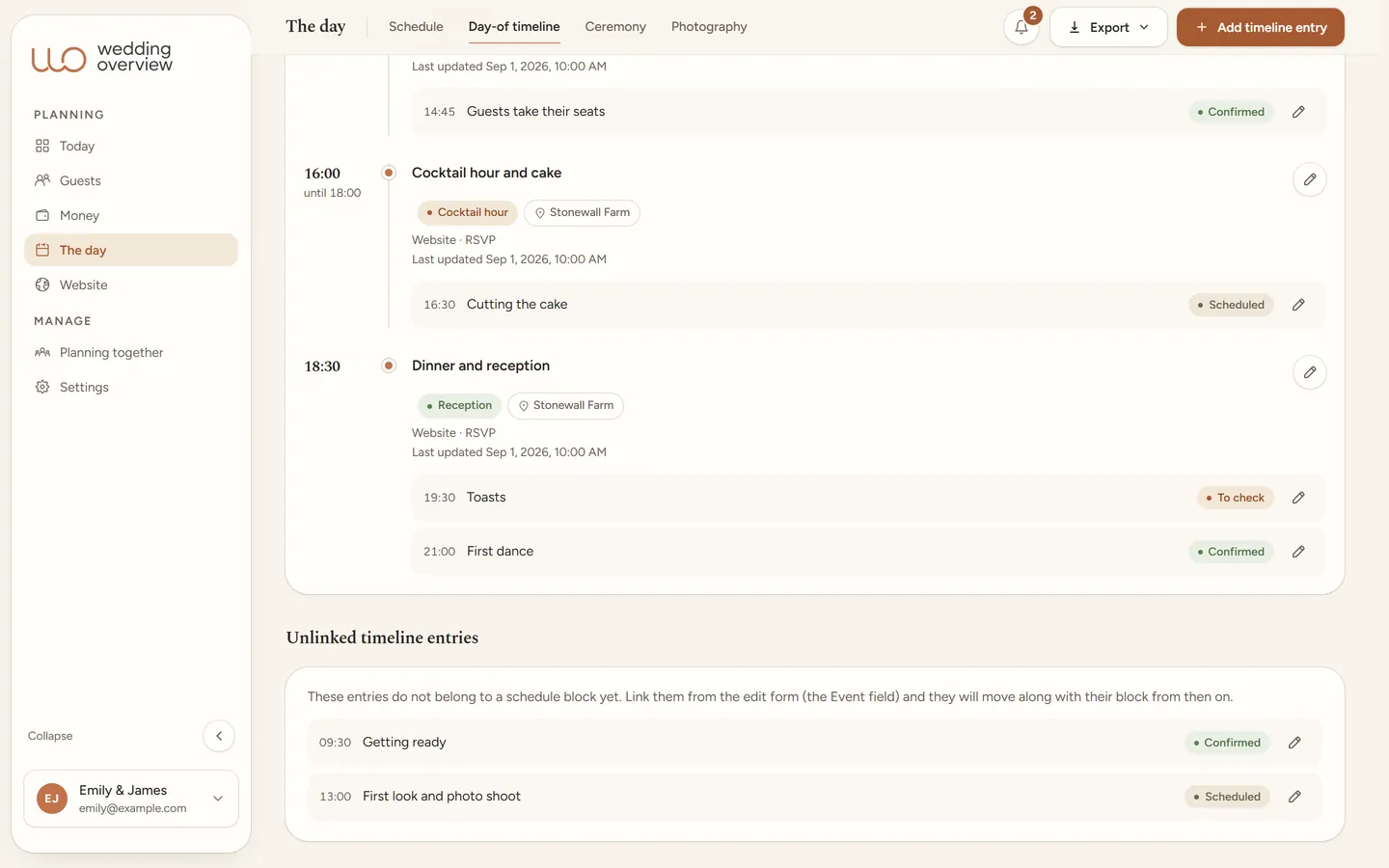
The day-of timeline in the app: schedule blocks for the ceremony, cocktail hour, and dinner, with the cue lines, times, and statuses below.
What it is really about

You are not the project managers of your wedding. You are the reason for it.

What you keep track of

Three things that otherwise live in five lists.

Wedding Overview is built around the parts couples usually keep scattered across spreadsheets, texts, mail, and notes.

The American route

The marriage license, the county clerk, who marries you, and the signed license going back, each as a task counted back from your date. The legal steps are in the checklist as reminders; what your own county requires, you look up once and keep in that task.

The day itself

Schedule, day-of timeline, and cues from one source, with a PDF per role for your photographer, DJ, and day-of coordinator. Plus the seating chart, budget, and vendors.

Guests, with privacy

Guests in groups, RSVP per person and per event, and dietary needs that stay private: with consent per guest, and an export that only carries what the caterer needs.

The wedding website

Your guests only see this.

No dashboard, no task list, just a wedding website to be proud of. And every answer from a guest flows straight into your planning.

and at the same time, in your app · Guests & RSVP
84of 126 answered
Waiting on 42 guests · reminder is ready✓ The Bennetts (4) added to the dinner guests✓ Kids menu ×2 → to the caterer list✓ The Bennetts declined · lists updatedDinner covers: 70 → 66

One answer from a guest is instantly an updated list, a headcount that adds up, and two kids menus at the caterer. Nothing to retype.

ourspecialday.weddingoverview.com/emily-and-james
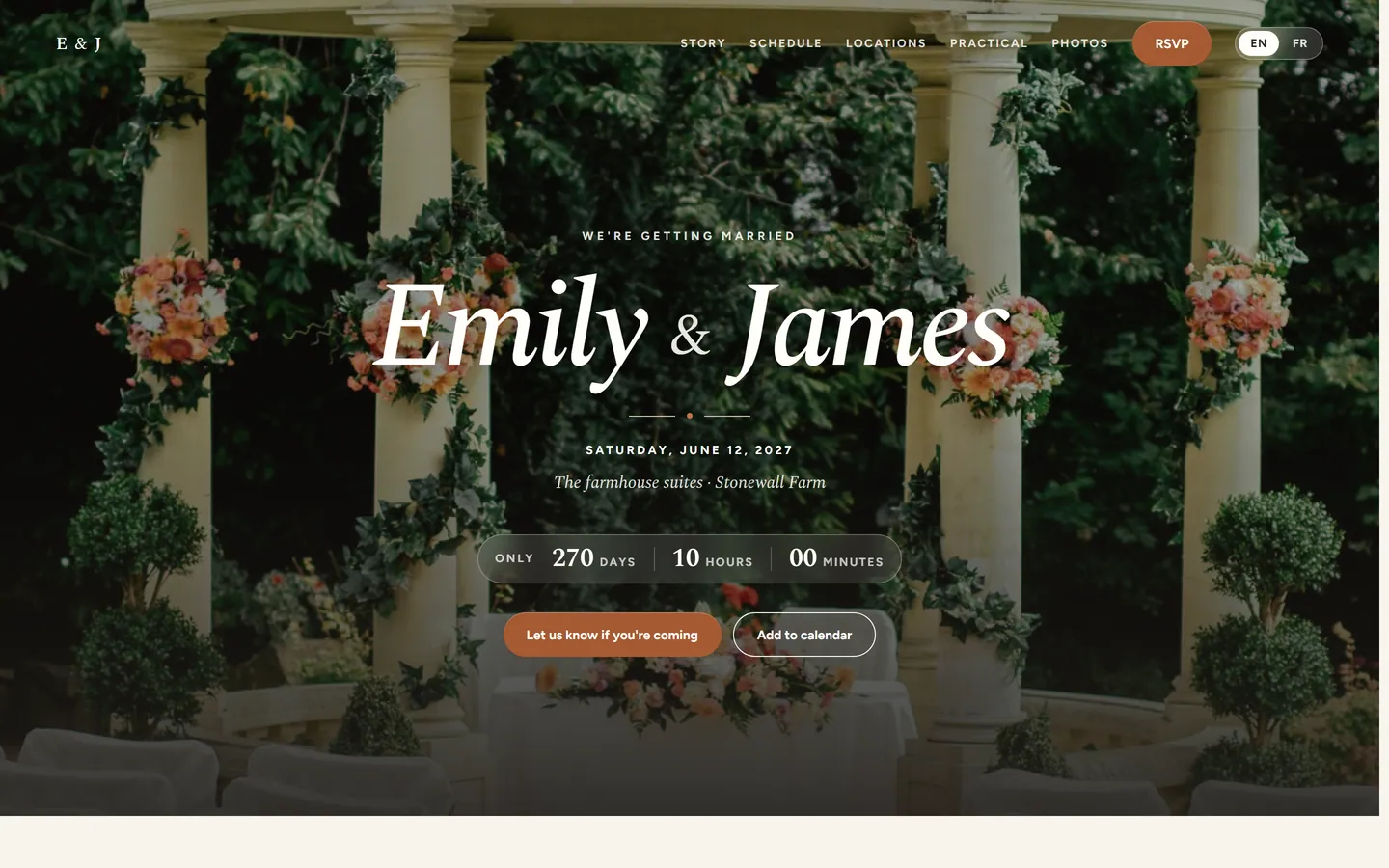
The real wedding website of the demo wedding: We are getting married, Emily and James, Saturday, June 12, 2027 at Stonewall Farm, with a countdown and an RSVP button.
RSVP
Will you be there?

The Bennetts · 4 people · ceremony & reception

Sent: you are coming, all 4 of you
Sent: sadly, no 4 guests

Star maps

The real night sky above your moments, from your birthdays to the evening it all began. Calculated astronomically from date, time, and place, as a section on your wedding website.

Where we met

The place where you first met, as a quiet map with your story beside it. In the style and with exactly the framing you choose.

Style

One considered house style, carried through everywhere.

No theme picker and no fuss: Wedding Overview comes in one warm look, Boho Terracotta. It carries automatically from the app to your public wedding website and your stationery, so planning and presentation stay one whole.

Boho Terracotta: warm terracotta, sage green, soft gold, ivory.
Applies to
App, website, and stationery
Sections
Schedule, locations, RSVP
Languages
English and French
Privacy
Access code
Setup
Nothing needed
The guest list in the app, in the Boho Terracotta house style.
The paperwork, on time

Built for getting married in the United States.

Getting married is also paperwork: the marriage license at the county clerk, who may marry you, and the signed license going back afterward. Rules differ by state and county, so the checklist does not pretend to know yours: it reminds you in time to look them up at your county clerk, and gives you a place to keep what you find.

The American checklist holds 172 tasks, each counted back from your date, including the marriage license steps. The dates are reminders; the rules of your county are the one thing you still look up.

−12 mo
Date & venue locked
The big decisions first. The rest of the planning counts back from this day.
−8 mo
Save-the-dates out
Guest list in households, with ceremony, dinner, and reception as separate invitations, not as column G.
−4 mo
Who marries you, confirmed
A friend ordained for the day or your own clergy: what counts differs by state, and the paperwork takes time.
−4 wkcheck your county
Marriage license
At the county clerk, together, with ID. Most states issue it in the weeks before the wedding and it expires after a set number of days.
legal deadline
The day
Day-of timeline handed over
Everyone knows where to be. All you have to do is get married.

More than a wedding website

A wedding website shares information. Wedding Overview helps you plan.

You do not just need a pretty page for guests. There are invitations, RSVPs, dietary needs, budget lines, vendors, tasks, tables, and timeline details that all have to keep agreeing with each other.

Loose tools

  • A spreadsheet for guests.
  • A separate website for practical info.
  • Emails for RSVP and dietary needs.
  • Notes for tasks and the day-of timeline.
  • Your banking app and quotes for the budget.

Wedding Overview

  • Which guests are invited?
  • Who said yes, per event?
  • Which dietary needs are sensitive and private?
  • Which payment is coming up?
  • Which vendor belongs to which moment?
  • Who sits at which table?
  • What has to happen when, on the day?

Already have a pretty website or a spreadsheet you love? Fine. Wedding Overview connects the planning around it: guests, RSVP, budget, vendors, the day-of timeline, and communication.

Who it is for

For couples who want to plan it themselves, but not remember everything themselves.

Wedding Overview fits best when you are organizing the wedding yourselves and want one calm place for every practical decision.

Self-planners

Plan your wedding yourselves, without everything disappearing into loose lists.

Together with your partner

Work with two accounts on the same guest list, planning, and budget.

A real guest list

Keep households, plus-ones, ceremony and reception guests, and RSVP per person.

With help

Give a day-of coordinator, family member, or helper access to exactly what they need.

A good fit if

  • You want to plan it yourselves and keep the overview.
  • Guests, RSVP, and dietary needs have to stay accurate.
  • Budget, payments, and vendors keep gaining detail.
  • You want a wedding website that works together with RSVP.

Less of a fit if

  • You only want a simple save-the-date page.
  • A full-service planner runs everything for you.
  • You do not want to track guests or RSVP online.
  • A single note and one small guest list are enough.
Planning together

Your partner

Plans fully, in the same wedding. No more forwarded screenshots.

Your day-of coordinator

Sees the day-of timeline, with times, locations, and contacts. Not your budget.

Parents & helpers

See what you share. Dietary needs and sensitive notes stay private.

Who sees what is up to you. Per person.

The most beautiful weddings are not tightly planned. They are calmly planned.

One price
$99once, for your entire engagement

No subscription. You only get married once.

Not for you after all? Get a full refund within 30 days.

Rather look first? The demo is free →
  • Your wedding website online, in the warm house style
  • Invitations, reminders, and personal RSVP links
  • The caterer list with dietary needs, exported
  • Through the day itself, and the thank-yous after
Start your wedding

Good to know

Do we have to type in our guest list by hand?
No. Paste your guest list in once: the columns are recognized, families become groups, and you see a preview before anything is saved. Not happy with it? Undo the whole import with one button.
Is the demo a real wedding?
It is a fully built demo wedding, Emily & James in the Hudson Valley, with 24 guests, a budget, vendors, and a day-of timeline. Create a free account, open the demo, and click anywhere. You cannot break anything.
Can guests RSVP without an account?
Yes. Each group gets a personal link and answers per person and per event. The answers land in your guest list, next to the dietary needs and the seating chart that use them.
What happens with dietary needs and allergies?
Guests share them themselves, with consent they can withdraw. You decide who sees them, and the caterer export only carries what the caterer needs.
What does it cost?
$99, once, for your entire engagement. No subscription and no ads. Not for you after all? You get your money back within 30 days.
And now, you

Start at the start: put the date in.

Today the date and your names. Next week the first guests. The rest grows along by itself. That is the idea.